Telegram Outreach
How to warm up Telegram Accounts for Outreach Campaigns
Serge Borisov
Introduction
Account warming is the process of gradually building activity and reputation for Telegram accounts before launching cold outreach campaigns. New or inactive accounts that suddenly start sending mass messages are flagged by Telegram's anti-spam systems, resulting in restrictions or permanent bans.
Proper account warming establishes your accounts as legitimate, active users — significantly reducing the risk of blocks and improving deliverability rates for your outreach campaigns.
Time Required: 10-14 days
Recommended For: All new outreach accounts and accounts with 2+ weeks of inactivity
Why Account Warming Matters
Without warming:
Immediate account restrictions after first outreach
Reduced message delivery rates
Permanent bans require a new account purchase
With proper warming:
Natural activity patterns established
Sustainable campaigns lasting months
Instead of permanent bans, accounts get restricted for short periods of time.
Account Requirements
Which Accounts Need Warming:
Purchased accounts with no prior activity
Accounts inactive for 2+ weeks
Set up Before Warming:
✅ Telegram Premium subscription for each account (required). Read here on how to send a Telegram Premium to all your accounts quickly.
✅ Complete profile: username, name, photo, bio
Submit your accounts to warm up in the CRMChat Dashboard
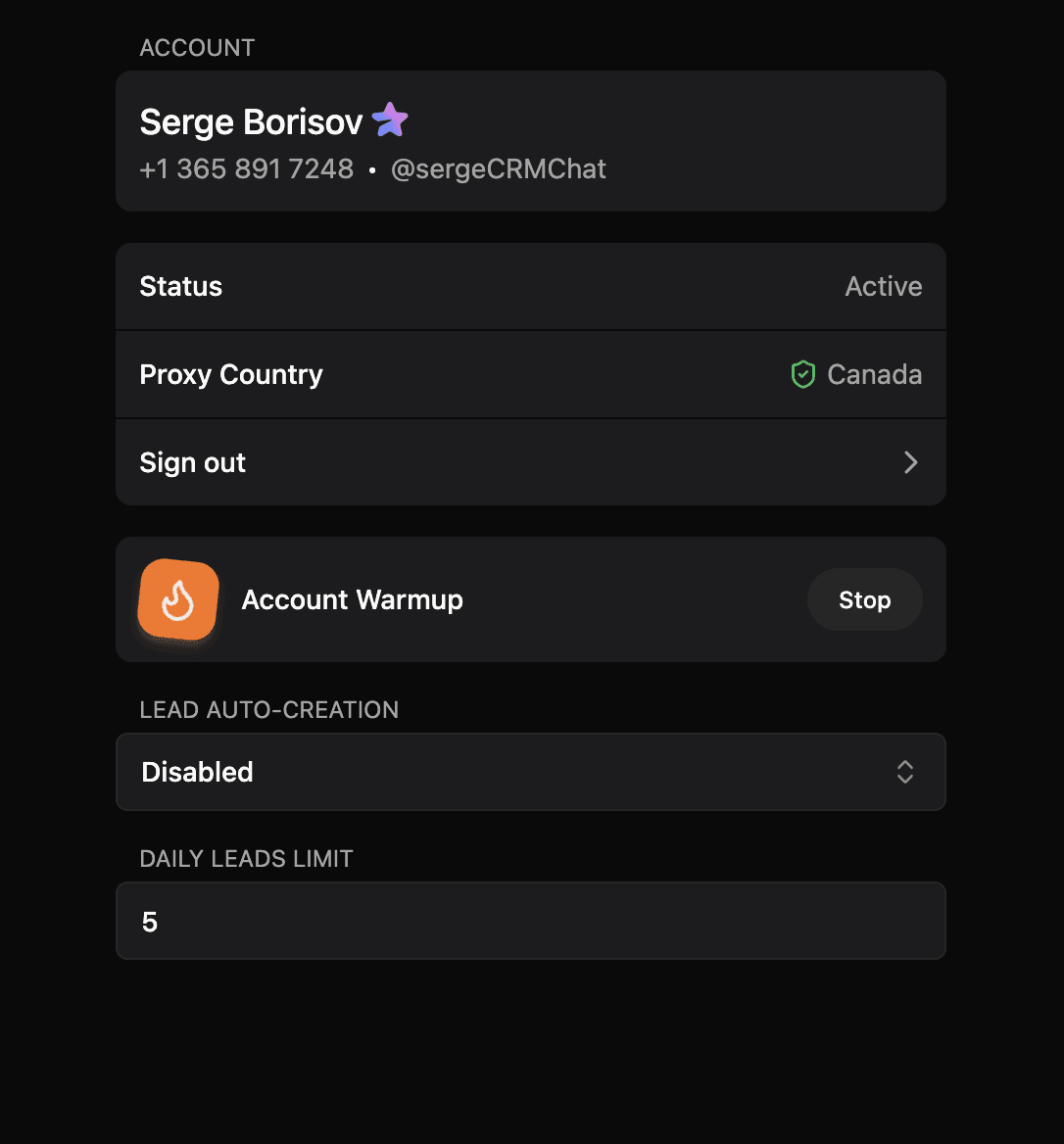
Go to Outreach → Telegram Accounts and connect your account to CRMChat. In the account setup panel, you'll find an account warmup button.
Best Practices
DO:
✅ Keep Telegram Premium active
DON'T:
❌ Use automation tools during warming
❌ Send cold messages before completing warm-up
Ongoing Maintenance
Daily Limits (Post-Warming):
Start: 5 cold messages/day
Increase by 2-3 every week
Maximum: 15 messages/account/day
Troubleshooting
Account Restricted After Warming
Solution:
Stop all outreach immediately
Contact @SpamBot from the restricted account, click /start
Pause campaigns for 1 day
Need Help?
If you have questions, contact our support team here. If you're an Outreach plan customer, you'll have a dedicated support chat with our team.
Next Lesson: Telegram Outreach Tips and Best Practices
Related Articles
Check articles from the same category