Rated 4.9/5
Unified Multi-Account Telegram Inbox
Stop switching between Telegram accounts. crmchat puts every DM and group chat from every connected account in one window, so you never miss a hot lead.


One Window
Every Account. Every Chat. One Inbox.
Chatting from ten accounts shouldn’t mean ten Telegram windows. Connect your accounts once and work all their conversations from a single list.
All Accounts in One List
Connect your Telegram accounts and their DMs and group chats appear in one list, newest first and updated in real time. No more hopping between windows.

One Lead, One Row
If a lead talks to three of your accounts, you see one row with unread messages added up. Switch accounts in the chat header and reply from the one you choose.

See Who’s Waiting on You
Needs reply shows chats where the other side wrote last. Unread catches everything new, and the account filter narrows the list to the accounts you pick.

Your CRM Beside the Chat
Open Lead in CRM to see the profile, properties, notes and tasks next to the conversation. Not a lead yet? Add them to the CRM from the same spot.

Filters
Filters That Clear the Noise
Go from hundreds of chats to the few that need you now.
Needs Reply
Shows chats where the last message came from the other side, so no reply slips through.
Unread
Every chat with unread messages on any account, with counts added up in one badge.
Accounts
Focus on one account or a few. Pick them here and the list shows only their conversations.
Search
Find a chat by name or @username across all your accounts.
Group Chats
Keep client and partner groups in the list, or switch them off to focus on DMs.
Muted Chats
Muted chats stay hidden by default. Turn them on when you want the full picture.
For Teams
Share the Inbox, Not the Logins
Everyone works from the same workspace, so nobody has to pass around phone numbers and login codes.
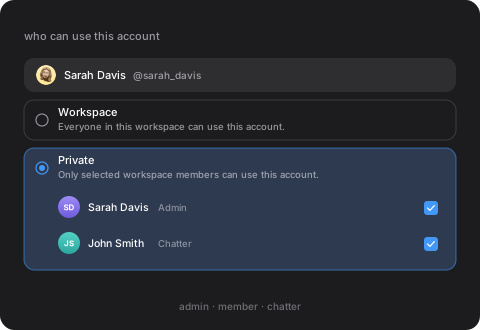
Decide Who Can Use Each Account
Set an account to Workspace and everyone can use it, or to Private and only the members you select can. The Chatter role can’t delete messages or chats.
Know When a Lead Replies
The lead’s owner gets a Telegram message from the crmchat bot saying who replied and on which account, with a button to open the chat.

How it works
Up and Running in Three Steps
Your Telegram chats stay as they are. You just see them all together.
1. Connect Your Accounts
Add the Telegram accounts your team uses and choose who can access each one.
2. Work One List
Conversations from all accounts land in the inbox, including replies to your outreach campaigns.
3. Reply and Update the Deal
Answer from the right account and update the lead’s CRM card next to the chat.
“A team of 50 chatters needs one fast dashboard”
Switching between accounts in a high-frequency chatting workflow eats up a lot of time, and crmchat’s inbox solves that perfectly. Some of the features we asked for were built within two days.

Pix
Major Creator Agency