Troubleshooting & FAQ
Common Technical Issues
Serge Borisov
Folder Sync Problems
Issue: Folder won't sync
Solution: Remove all "Chat Types" dynamic parameters (Contacts, Non-Contacts, Groups, Channels, Bots, Muted, Read, and Archived) and folder invite links from your Telegram folder settings. Then try to sync again.
Team Invitation Failures
Issue: "Invitation failed" error
Solution: The invitee must start a chat with the CRMChat bot first, using https://t.me/crmchat_crm_bot and pressing the "Start" button before you send the invite.
Account Restrictions
Issue: Telegram account restricted from sending messages
Solution: Go to @SpamBot on Telegram using the restricted account and click /start. Typically, after 1 minute, your account restrictions will be gone (though repeated restrictions might increase the delay to up to 24 hours).
Telegram Premium Purchase Issues
Issue: Can't purchase Telegram Premium for outreach accounts
Solution: Go to @PremiumBot from your main account and gift Premium to purchased accounts, or purchase Telegram Stars from your main account and gift them, then buy Premium directly from each account.
Important: When purchasing Telegram Premium using @PremiumBot, use a virtual card, which you can easily block. Also, after purchasing a TG premium using @PremiumBot, type /stop to cancel automatic renewal.
This is due to the new Telegram account freezing policy, which prevents you from canceling your TG Premium subscription by typing /stop in @PremiumBot on a frozen account.
CSV Upload Errors
Issue: CSV file won't upload, or the data looks wrong
Solution: Ensure the file is saved as CSV format, has clear headers in the first row, and includes a Username column for outreach sequences.
Sequence Not Sending
Issue: Outreach sequence created, but not sending messages
Solution: Check daily sending limits in Outreach → Telegram Accounts. Ensure the accounts are connected and limits are set. Verify that Telegram Premium is purchased for all outreach accounts.
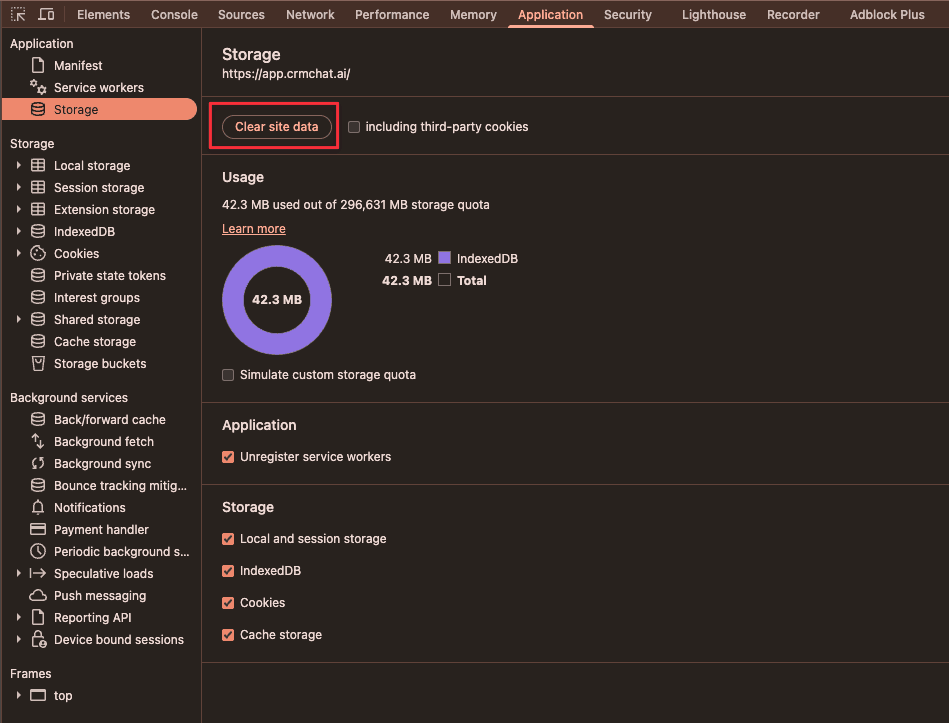
In the "Chat" section, when I choose one account, a different one opens
When app.crmchat.ai is opened in your browser, click F12 to open DevTools (fn+F12 on Mac)
Find Application Tab above
Click on "Clear site data"
Related Articles
Check articles from the same category